As an assistive technology consultant I work with individuals with all ability levels related to their disabilities or technology knowledge. I have the pleasure of helping individuals figure out how technology fits into their lives. Often I am like the seamstress helping the individual select the tool that meets their needs almost perfectly. As the seamstress, my job is also to nip, tuck and add special details to make it just exactly what the person needs. There are times that I am handed a piece of technology that I need to retrofit. Sometimes as the seamstress, I must say that I am sorry but this piece will not work the way you expect because there is far too much nipping, tucking and it doesn’t allow me the special details you wish to have. But there are times, that as a the seamstress, I get to look and evaluate the structure of how an item is meant to work and say “Yes, I think we might be able to nip, tuck and add that little extra for you”.
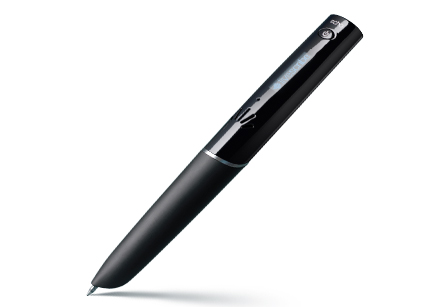
Recently, I had the experience of retrofitting a piece of technology to an adult who has poor vision and traumatic brain injury. Her family found at the store and they a Livescribe pulse pen. They thought this would be a perfect device for their mom because she always forgets things and cannot see what she is writing. When I was presented with the pen, I was confused. As the seamstress, it would be similar to be handed a bridesmaid gown and asked “Can you change this so I can wear it for daily wear?” I put all the typical responses aside because I knew my client was excited about this new tool. She didn’t know what it could do but her family told her it would be perfect.
The first thing I needed to figure out was, how did Elsie see herself using the pen. It is nice that everyone has a vision of how it can be used but Elsie is the end user. The best meaning vision is her vision. Her vision was to be able to able to take a person phone number down and use it later, when she goes to the doctor remember her medications and how often she takes them, and to follow any changes in care. The biggest one was to document when she made calls who she spoke with, when she called, when they said they would call her back and so on. Her vision was very different than the families.
The second thing I needed to contend with is Elsie’s vision and the complications from her brain injury. Elsie’s vision I am told is 20/100. She has difficulty seeing shades of color. If you have ever opened a Livescribe notebook, the pages have a shade of blue because of the millions of little dots per line that help the pen do its magic. For Elsie this is not a great thing because she cannot see the line she is supposed to be working on. This is a bone of contention with Elsie because she can see her words are slopping all over the page although she cannot read the words she can write. The brain injury has left her with the inability to decipher the letters. When she explains it to me, she says they are just lines that move in different directions sometimes looking like pictures. After listening to Elsie talk about how her vision and brain injury affects her ability to read what she wrote, I asked her Elsie can you still draw? With that she lifted the pen and drew this amazing picture of cat with fine detail. So the idea was born, that Elsie would not write words on the paper she would draw a picture of the conversation.
We sat and brainstormed different symbols that would have meaning for Elsie. The first symbol was easy, a phone and the symbol for number. Elsie is always losing my phone number so we practiced her new way of taking notes. As Elsie was drawing a picture of the phone I gave my name, agency name, and what services I provided for her. When she started to draw the number sign, I gave her my cell phone number. Now she has a way to call me when she needs help. She taps on the symbol on the phone and she gets my name. When she clicks on the number sign she gets my number. Elsie loves that she can tap backwards and pause so she can dial.
The second symbol was her medication. We brainstormed different things and this is what we came up with. Elsie thought the shape of the pill would be great except all her pills are round. We finally decided on a medication bottle and a clock. The medication bottle she would draw and as she was drawing she or a family member would name the medication. Next to the medication bottle she would draw a clock so she could say Morning, Noon, Dinner or Bed. If she needed to take the medication more than once a day, she would make two clocks.
Now the biggest hurdle I think we needed to figure out was Elsie had a dream. She wants to write a book about her life and experiences. Elsie is someone that has amazing stories to share but because she struggles with the computer, she finds doing this task extremely difficult. Since she has the Livescribe pen we decided to use the pen to record her stories. Now because of her head injury sometimes her thoughts get confused. The pen allows her to describe the event, experience or thought and one of her friends or family members transcribes it onto the computer. When the thoughts don’t go together, then they write the thought in a different color and highlight it so Elsie can decide what to do with it.
Although the Livescribe pen is a retrofitted technology we found ways to think outside of the box for their use. We have created a specialized notebooks for doctors, address book and her thought journal. They are small enough to fit into her bag so she can carry them anywhere she goes. We have made some tweaks along the way to help others. We asked the pharmacist to print extra labels for her medication on the back of her page, she sticks the labels. For professionals working with Elsie she attacks a business card to the back of the page. This allows for individuals with sight to help Elis when needed. We also made special paper for Elsie. We printed pages out and then sent them through a photo copier so we could copy nice dark lines on the paper from a plastic writing grid. This allows Elis to continue to practice her penmanship. Her penmanship is beautiful and legible and laborious but it is meaningful to Elis.
How are you using the Livescribe pen?



 Posts
Posts

